Zimra Invoice Number vs Seller Invoice Number
Difference between the ZIMRA Invoice Number & Seller Invoice Sequence
When you produce fiscal invoices and fiscalise, your fiscal invoice has two Invoice number references:
- Seller Invoice Number (follows your sequence within the accounting software)
- ZIMRA Invoice Number
When manually verifying your invoice on the FDMS website, you use the second part of the ZIMRA invoice number provided on the fiscal invoice, NOT the seller invoice.
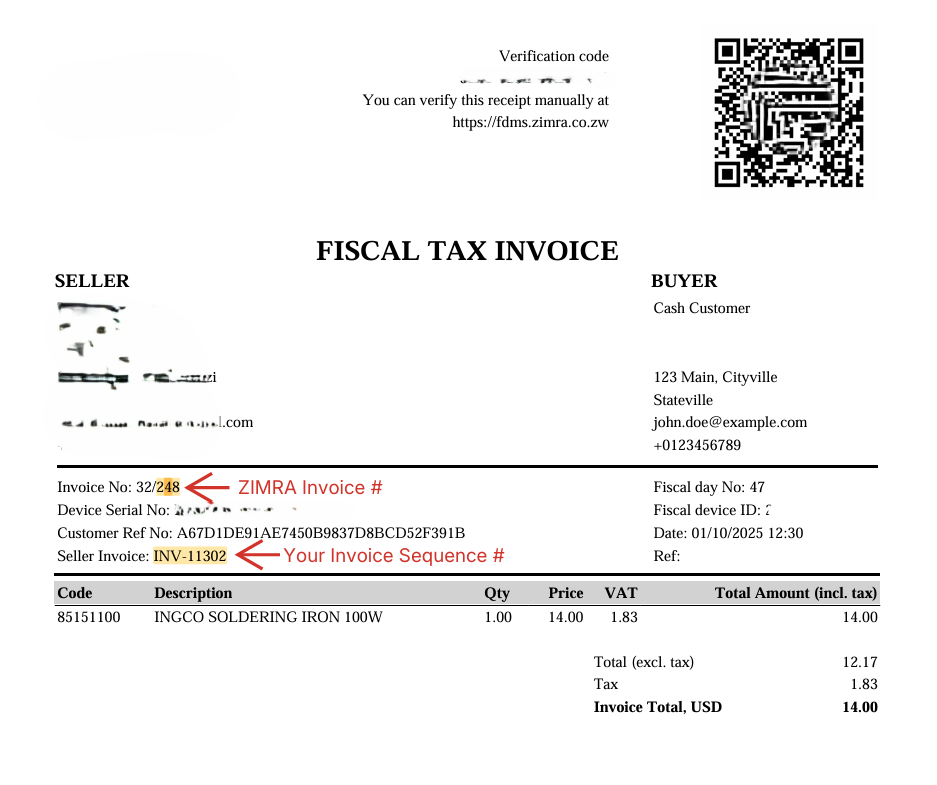
When you do a credit note, it will reference the ZIMRA invoice number as highlighted on the invoice below, and it also then continues the ZIMRA sequence as well.
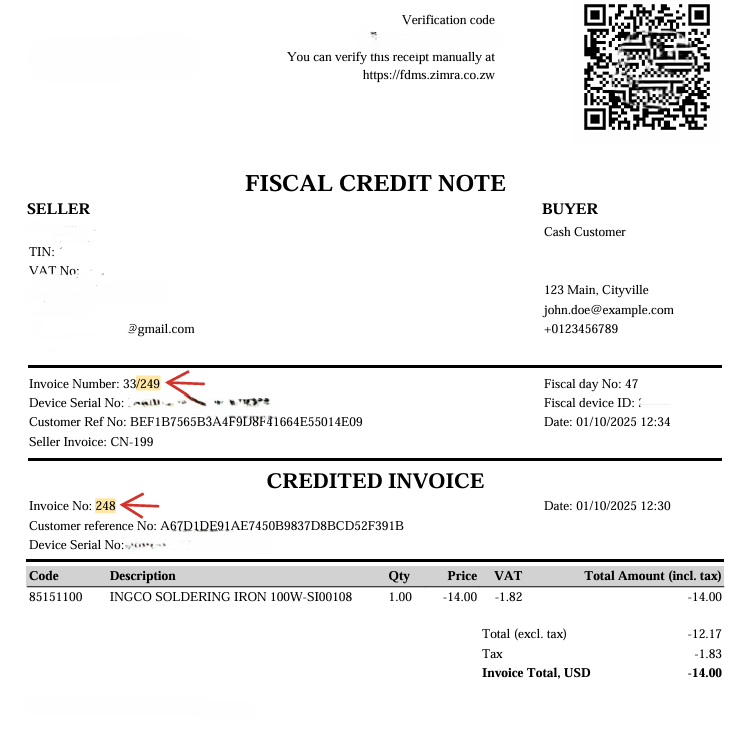
The ZIMRA invoice number does not invalidate your Seller invoice number.
Related Articles
Fiscalising an Invoice in Excel
Prerequisites Ensure that you open the invoice template using Microsoft Excel only. Steps to create an invoice Step 1. Add Buyer Details Open the Fiscal Harmony Invoice template. Fill in the buyer's details in the specified fields. If the ...Fiscalising an Invoice in Sage Online
Overview Producing a fiscal tax invoice is an important step for every business. It ensures your clients can easily view, verify and scan their invoices for authenticity and ZIMRA compliance. Prerequisites Before you begin, make sure you have the ...Fiscalising an Invoice in ERPNext
Overview This guide walks you through the steps to correctly create, save, and fiscalize a Sales Invoice in ERPNext, ensuring compliance by applying necessary taxes and submitting your invoice. Step-by-step Process Step 1. Starting a New Sales ...Fiscalising an Invoice in Sage Evolution
Overview Sage 200 Evolution is an Enterprise Resource Planning (ERP) software system designed to help businesses manage various aspects of their operations, including finance, customer relationships, and supplier relationships. It goes beyond ...Fiscalising an Invoice in Manager.io
Overview This guide provides a step-by-step process for fiscalizing an invoice using the Relay button in Manager IO after integrating with Fiscal Harmony. It also outlines the prerequisites and best practices to ensure successful fiscalisation. ...