Odoo and Fiscal Harmony Integration
Overview
Prerequsites
Please kindly note that in order to integrate with ODOO, you will need to:
- Engage the ODOO accounting service provider to host the FISCAL HARMONY plug-in on system's database, whether it is hosted online or locally. Attached here is link to download the FISCAL HARMONY plug-in:[ Download the FISCAL HARMONY ODOO PLUG-IN here]
Instructions for Fiscal Harmony API Integration with Odoo
Please follow the steps below after the installation has been completed in the database.
Step 1. Collect API Details from the Client’s Fiscal Harmony Portal
- Log in to the client’s Fiscal Harmony app on https://app.fiscalharmony.co.zw/ with their credentials.
- Navigate to the API section and collect the following details:
- API Key
- API Secret

Note: Two-Factor Authentication (2FA) may be required. It is recommended to use Google Authenticator for this process.
Step 2. Apply API Keys in Odoo
- Log in to the Odoo Accounting System.
- Go to Apps > Fiscal Harmony > Fiscal Harmony API Settings.
- Fill in the following details:
- Configuration Name: (Use the Company Name)
- Company Name
- API Key
- API Secret
- Click Test Connection. A User ID will be assigned to the device and displayed at the top right corner (as shown in the image below, if available).
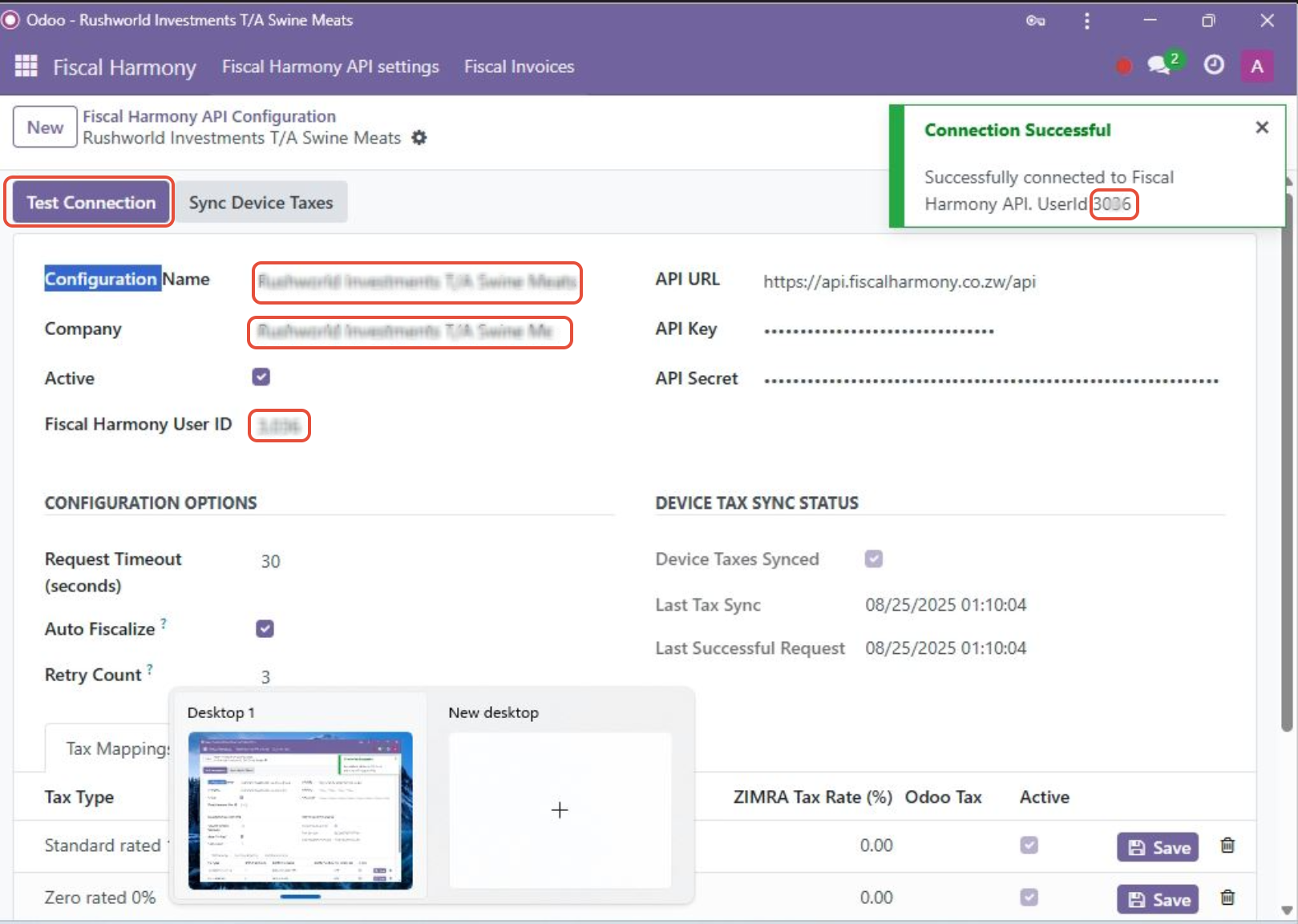
- Copy this User ID and paste it into the Fiscal Harmony User ID field.
Step 3. Tax Mappings
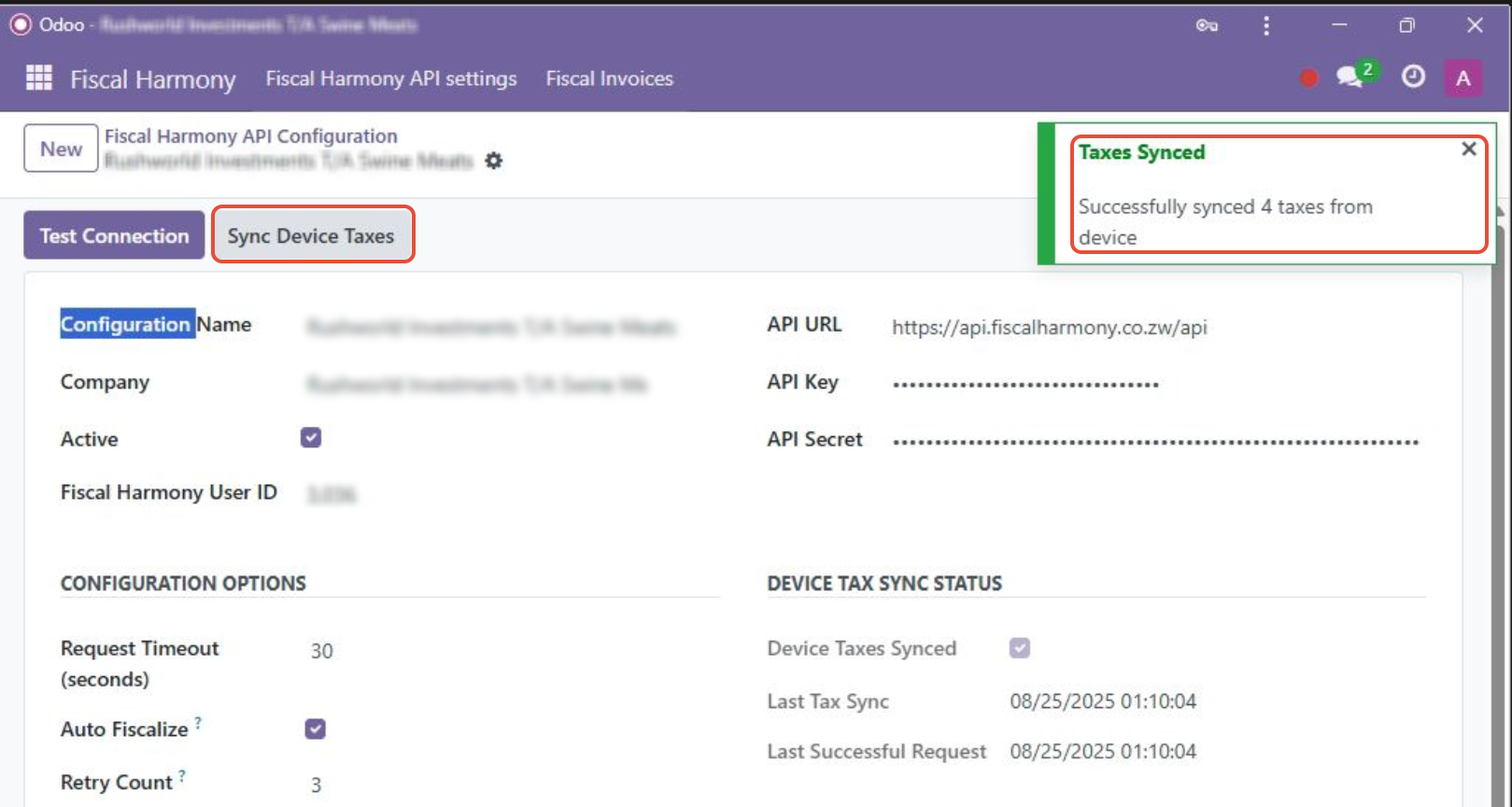
- Click Sync Device Taxes. Taxes available in the Odoo system will be fetched automatically.
- Under the Odoo Tax column, map each tax correctly according to the tax type (e.g., 15%, 0%).
- Save each tax mapping individually.
Step 4. Currency Mappings
- Map each Currency in ZIMRA with the corresponding Currency in Odoo.
- Click Save for each currency.
For further assistance, reach out to our support team:
Call Centre: +263 8677 010 305
Call Centre: +263 8677 010 305
WhatsApp: +263 783 323 154
Related Articles
Meat Matrix and Fiscal Harmony Integration Guide
Overview This guide outlines the steps to integrate Meat Matrix with the Fiscal Harmony plugin for the compliant fiscalisation of invoices and credit notes with the Zimbabwe Revenue Authority (ZIMRA). Prerequisites Download the Fiscal Harmony Plugin ...ERP Next and Fiscal Harmony Integration Guide
Overview This guide provides a step-by-step process for integrating ERP Next with the Fiscal Harmony plugin, facilitating the fiscalization of invoices and credit notes for compliance with the Zimbabwe Revenue Authority (ZIMRA). Prerequisites Setting ...QuickBooks and Fiscal Harmony Integration Guide
Overview This guide provides a step-by-step process for integrating QuickBooks with the Fiscal Harmony plugin, facilitating the fiscalization of invoices and credit notes for compliance with the Zimbabwe Revenue Authority (ZIMRA). Step 1. Downloading ...MS Excel and Fiscal Harmony Integration Guide
Overview This guide explains how to install and configure fiscalisation in Microsoft Excel using the Fiscal Harmony software. It walks you through downloading the required files, installing the necessary tools, and setting up the integration so that ...Manager.IO and and Fiscal Harmony Integration Guide
Overview This guide outlines the steps necessary to set up fiscalization using Manager IO and integrate it with Fiscal Harmony APIs. The process involves obtaining API credentials, configuring fields in Manager IO, and setting up the integration to ...