Implementing HS Codes in Excel Using Fiscal Harmony Template
Overview
Harmonised System (HS) Codes are standardised numerical classifications used globally to identify and categorise traded products. These codes ensure uniformity in customs declarations, tariffs, and trade documentation.
Key Features of HS Codes
- 8-digit standard (internationally recognised).
- No symbols (commas, periods, or spaces).
- Unique to each product type.
Step-by-Step Guide
Step 1. Setting up Invoice
Enter the information based on the table below:
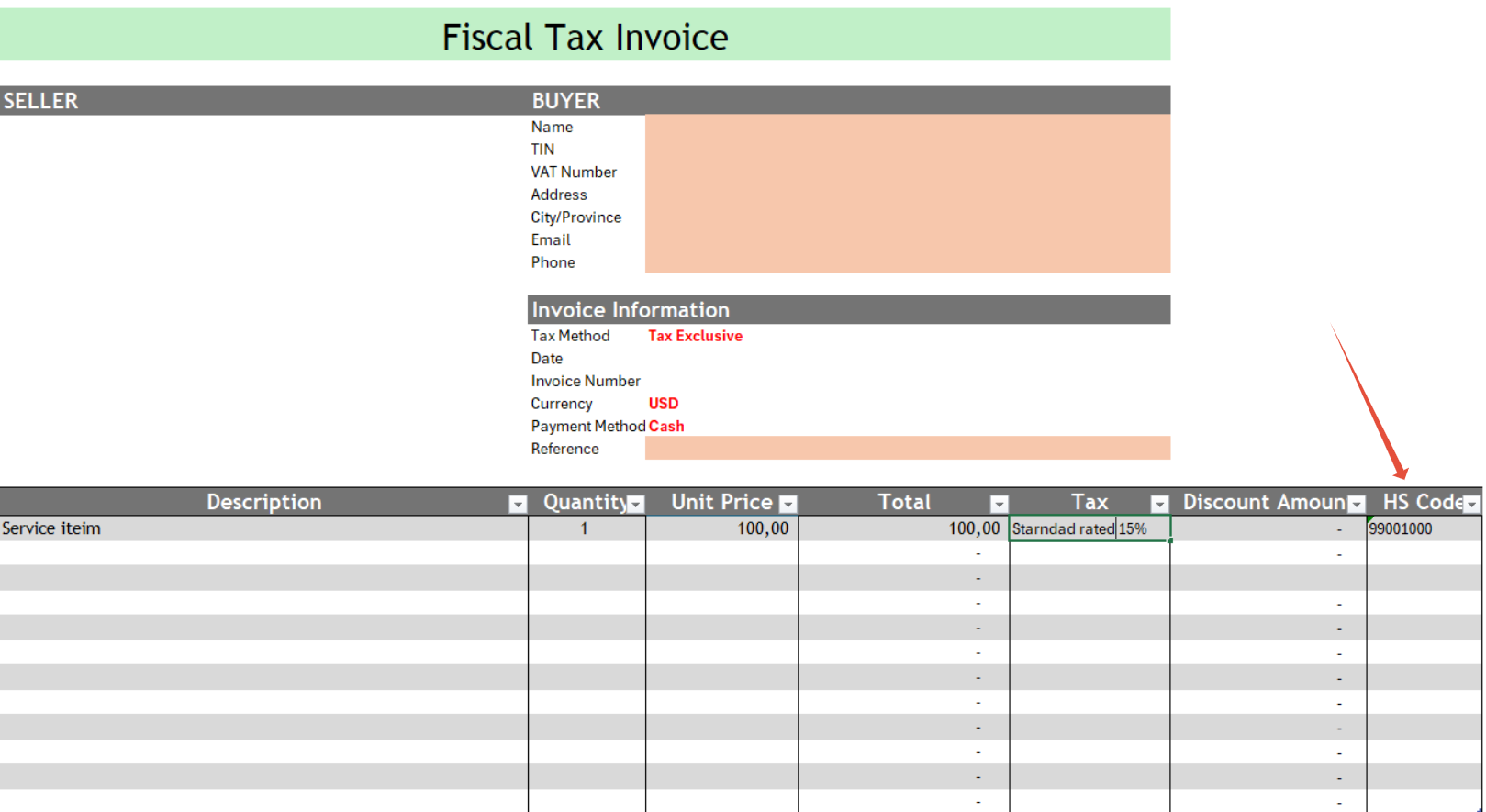
| Column | Instructions |
| Description | Enter the product or service being sold. |
| Quantity | Input the number of units sold. |
| Unit Price | Enter the price per unit (without taxes). |
| Total | Automatically calculated (Quantity × Unit Price) |
| Tax | Click the dropdown to select the applicable tax rate. |
| Discount | Enter the exact discount amount (not percentage). |
| HS Code | Enter the 8-digit HS Code (do not copy paste). |
Important Notes for HS Codes
- Must be 8 digits (e.g., 12345678).
- No commas, dots, or spaces (e.g., 12.34.56 or 12,345,678 is invalid).
Finding HS Codes
- Use Google search (e.g., "HS code for [product]").
- Avoid copying and pasting—type manually to prevent formatting errors.
Step 2. Fiscalising the Invoice
- Save the Excel file.
- Navigate to the Fiscal Harmony tab.
- Click "Fiscalise Invoice" to generate the tax-compliant invoice.
Related Articles
Implementing HS Codes in ERPNext
Overview An HS Code (Harmonised System Code) is an 8-digit number that uniquely identifies a product. There is no specific field for entering an HS Code, but ideally, in the ERPNext Fiscalisation app, it is added in the Fiscal HS Code document. The ...Implementing HS Codes in QuickBooks Desktop
Overview HS codes, also known as Harmonised System Codes, are standardized numerical codes used to classify products in international trade. They are unique codes that identify and describe a product or service. Step-by-step Guide Step 1. Navigate to ...How to add HS Codes in QUICKBOOKS
What are HS-Codes ? HS codes, also known as Harmonized System Codes, are standardized numerical codes used to classify products in international trade. They are unique codes that identify and describe a product or service. How to implement HS Codess ...Implementing HS Codes in Palladium Accounting
Overview Harmonized System (HS) Codes are standardized numerical classifications used globally to identify and categorize traded products. These codes ensure uniformity in customs declarations, tariffs, and trade documentation. Key Features of HS ...Implementing HS Codes in Manager.io
Overview HS Code (Harmonised System Code): Each inventory item on the invoice must have an HS Code associated with it. This code classifies the product or service for tax purposes. Step-by-step Process Step 1. Set up Custom Fields Go to Settings in ...