Device Deregistration
This is a step-by-step summary on how to deregister a device.
Step 1
Log in to the Fiscal Harmony portal at (https://app.fiscalharmony.co.zw/)
Step 2
Once in the dashboard, click on the Account Icon (labelled "Account") located at the top right corner. Here it will show a dropdown, where you can select Billing.
Step 3
On the page which says "My Account", you will be on the tab that says "Billing". Navigate to the subscription of your choice and click on the button that says "Cancel Subscription".
Step 4
A pop-up will be shown with details to enter your reasons for your deactivation.

Note: if you have an outstanding balance, you would have to settle the balance by clicking Pay Now.
Confirm details for the device: Verify the Device ID and Device Serial Number. Provide reasons to specify why the device is being deactivated and then click "Continue": Proceed with the deactivation. process.
Step 5
You will be presented with a generated document that declares the deactivation of your device. You have the option here to cancel the deletion, as well as to cancel the process.
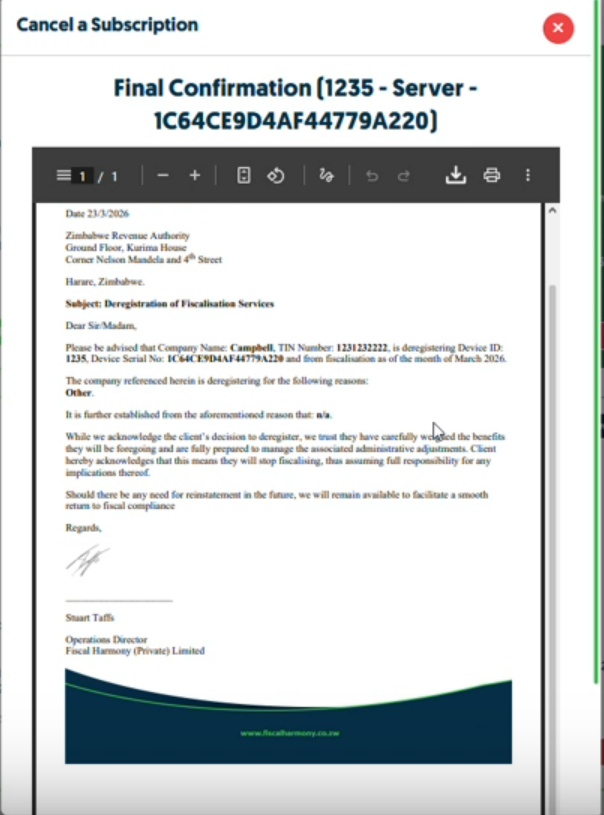
To confirm the deactivation request, simply click on "Confirm Deactivation" and this request will be sent to the support team to deactivate it for you.

Related Articles
Deregistering from a previous supplier to Fiscal Harmony
Migration Overview This document outlines the essential steps to migrate to Fiscal Harmony's fiscalisation system. Follow each step to ensure smooth integration and deregistration of your previous device. Step-by-Step Migration Guide Step 1: Acquire ..."Printer Unavailable" Error Message on the New HPOS Interface
"Printer Unavailable" Error Message on the New HPOS Interface To resolve the printing error, please kindly follow the steps below: Long press on the power button on the left of the device Select the 'Services' option. Then select 'Auto-Init' It will ...Step-by-Step Guide for Resellers to Register a New Client on their Platform
Overview As a Fiscal Harmony reseller, you unlock exclusive benefits, high-profit potential and the opportunity to grow your business portfolio with our industry-leading software solutions. Our program equips you with expert training and dedicated ...Xero and and Fiscal Harmony Integration Guide
Overview Fiscal Harmony can be integrated with Xero in order to Fiscalise Invoices generated in Xero. Integrating Xero with Fiscal Harmony Step 1. Go to https://app.fiscalharmony.co.zw/login/. Select "Sign In with Xero". Login from Xero so it takes ...Updating & Re-Installing your HPOS App into Ingenico
Step-by-step Process Step 1. Uninstall the App on device Long-press the HPOS logo on the home screen. When the app options appear, tap “Uninstall”. Step 2. Installing Updates Long-press the Power button (located on the left side of the device). On ...