How to change VAT in Odoo Accounting
Overview
It is important to know when and how to change the VAT in your system to stay tax compliant and keep our tax records correct. For example, in January 2026, ZIMRA's VAT increased from 15% to 15.5% under the 2026 Budget.
To stay compliant, update your tax settings in Odoo so all invoices reflect the new rate.
Step-by-Step Guide
Step 1. Navigate to Configuration
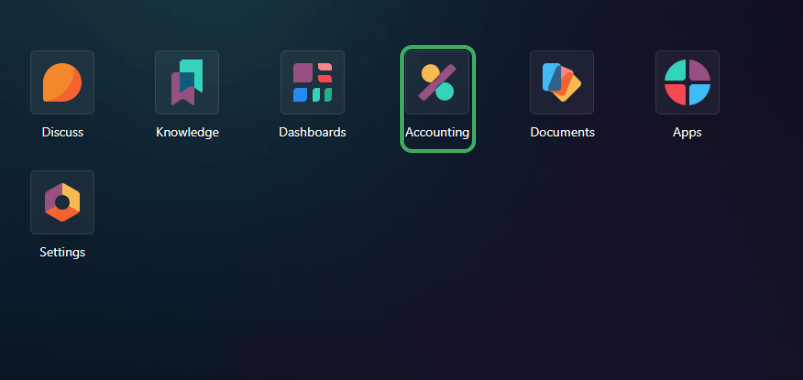
- Enter Odoo Accounting.
- From your main menu, click on Accounting or POS.
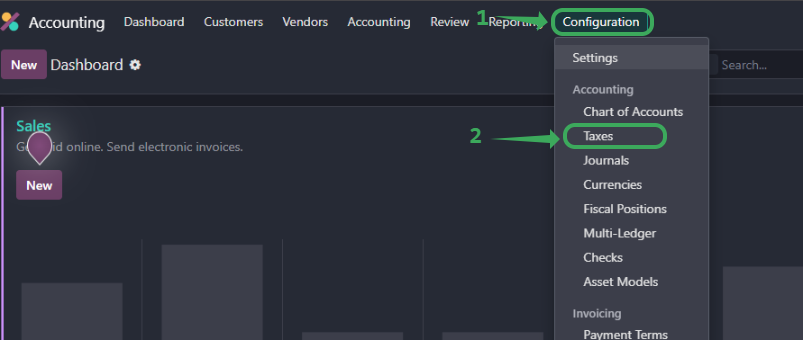
- From the top menu, navigate to Configuration > Accounting > Taxes.
Step 2. Create or Edit a Tax
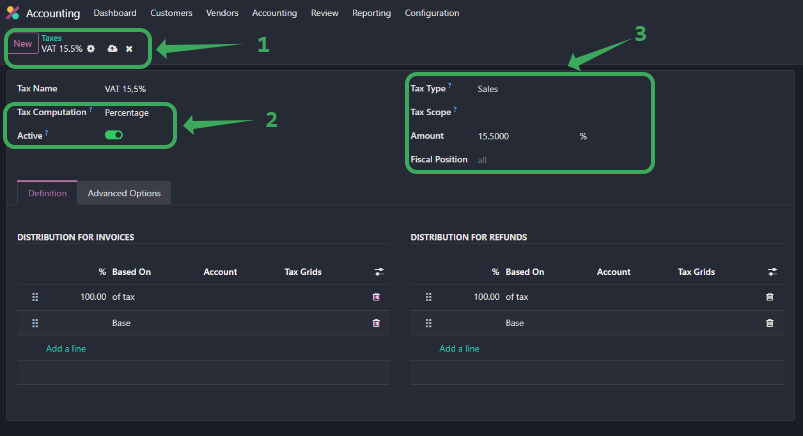
- Click New or select an existing VAT entry to update.
- Set the Tax Name to the new VAT name of your choice (e.g. 15.5%).
- Set the Amount to the new Tax rate (e.g. 15.5).
- Make sure Tax Type is Sales and Active is toggled ON.
Step 3. Set Distribution
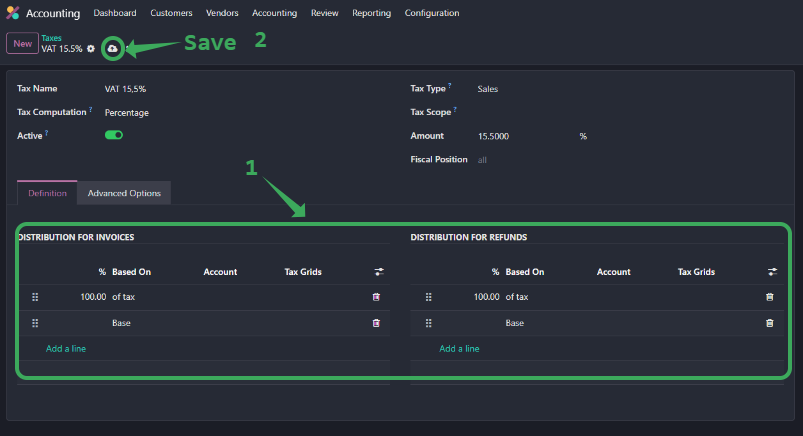
- Under Definition, set 100% of tax to apply to the Base for both invoices and refunds.
- Leave Tax Scope and Fiscal Position as default unless you use custom setups.
Step 4. Save and Test new Tax Rate
- Click Save.
- Try creating a test invoice to confirm VAT is calculated at the new rate.
Related Articles
How to Change VAT in Odoo 17
Overview It is important to know when and how to change the VAT in your system to stay tax compliant and keep our tax records correct. For example, in January 2026, ZIMRA's VAT increased from 15% to 15.5% under the 2026 Budget. To stay compliant, ...How To Change VAT in Odoo Cloud
Overview To change a VAT rate in Odoo Cloud, it is recommended that you create a new tax record with the updated rate rather than editing the existing one. This approach preserves the historical accuracy of past transactions. Step-by-step Guide Step ...Updating VAT in Cin7 Core
Step-by-Step Guide Step 1: Go to Tax Settings Log in to Cin7 Core with your Admin credentials. Navigate to Settings → Financial Settings → Tax Rules. This is where all tax rules are created and managed. Step 2: Create a New Tax Rule Default tax rules ...How to Change VAT in Palladium Accounting
Overview It is important to know when and how to change the VAT in your system to stay tax compliant and keep our tax records correct. For example, in January 2026, ZIMRA's VAT increased from 15% to 15.5% under the 2026 Budget. Step-by-Step Guide ...How To Change VAT in Xero
Overview In Xero, you cannot directly change the percentage of an existing VAT rate if it has already been used in transactions. Instead, you should create a new VAT rate and then apply it to new transactions or update defaults. Step-by-Step Guide ...